
How to Make an Alors on Danse AI Video
Make the two-person keyboard scene with two photos. Choose 5, 15, or 30 seconds, review the total credit cost, and download one complete video.
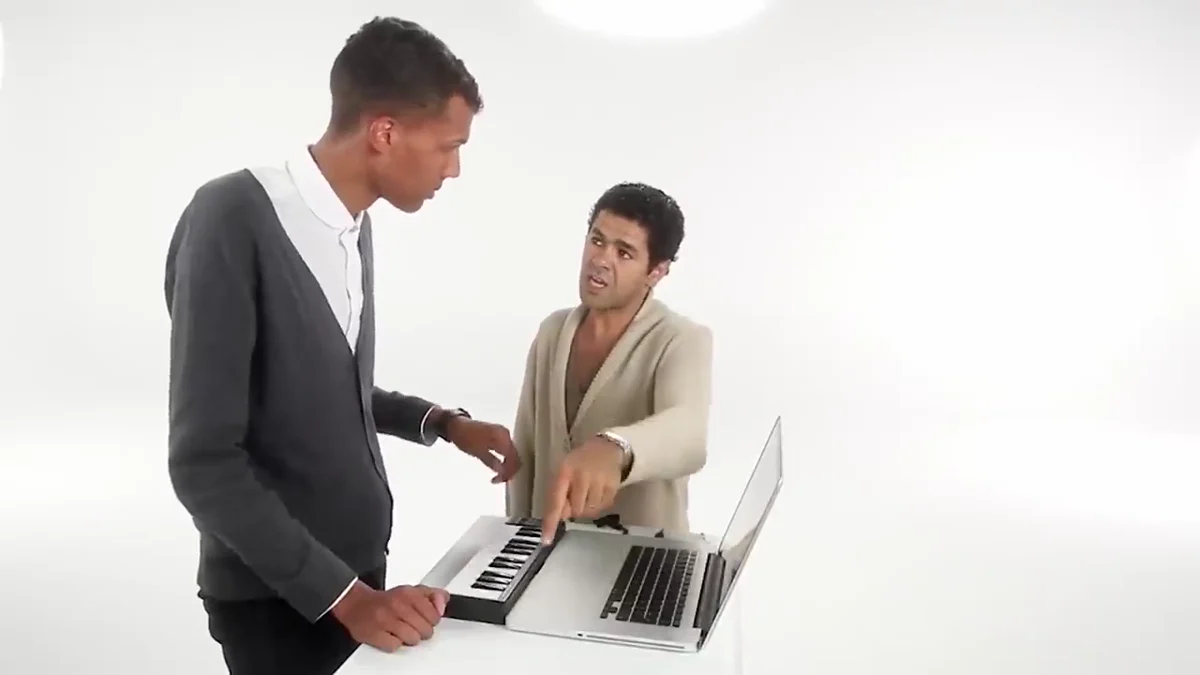
Assign two photos to the keyboard player and partner, then choose a length and quality. The Alors on Danse AI video generator offers 5, 15, or 30 seconds with 480P or 768P output. Review the total credit quote before starting. Every length is one task with one finished video to download.
The cover and source preview illustrate the reference scene; they are not examples of a generated customer result.
What is the Alors on Danse keyboard video?
The white-studio format comes from Stromae and Jamel Debbouze's comedy sketch in Made in Jamel (2010), often called the song's “making-of.” Jamel TV uploaded the sketch on November 6, 2025, years after its original release. The official song video is a separate work.
In AI versions, the two performers are recast while the recognizable keyboard-and-partner setup remains. You may also encounter the descriptive name “two guys in suits making a beat,” used by an existing template page.
Prepare two photos and assign the roles
Use one person per image so each upload has a clear identity. Choose photos you have permission to use, and check the slot labels before submitting:
- Photo 1 — keyboard player, left. Choose the person you want at the keys. A clear face and visible shoulders help you assess whether the result stays recognizable when the head tilts down.
- Photo 2 — partner, right. Choose the person who reacts and gestures beside the player. Avoid a hand, phone, or heavy shadow hiding the face.
- Check both previews. Confirm that the people are in the intended slots. Prefer sharp, evenly lit pictures without strong beauty filters or motion blur.
- Choose the length and quality. Select 5, 15, or 30 seconds, then 480P or 768P. Check the displayed total credit charge and start generation. Inspect the finished video before downloading or sharing it.
Do not choose a photo only because it resembles the reference pose. Facial detail matters too. For framing, lighting, and obstruction examples, use the photo preparation checklist.
Choose 5, 15, or 30 seconds
A Reddit viewer on October 3, 2026 asked whether one tool could make the scene and what 30 seconds would cost. That question does not establish every generator's capabilities.
All three options use fal's H3 Max reference-to-video model. Choose 5 seconds for a brief scene, 15 seconds for a longer exchange, or 30 seconds for the full-length option. The tool starts at 15 seconds; changing the length updates the total quote before you submit.
For 30 seconds, the tool handles the longer version automatically and delivers one complete video. You follow one task, with no manual editing required. The provider documentation describes H3's reference-to-video interface; the tool manages the processing needed for its 30-second option. Check faces, movement, and scene continuity in the finished result, because automatic processing does not guarantee visually seamless output.
How much does it cost?
Use the total credit quote on the tool for the selected length and quality. It includes automatic processing for that video. The live quote reflects the current configuration; compare it with your available balance before generating. You can pay with existing credits or purchase a credit pack.
Keep some budget for another attempt if the first result has a visual problem. A technically completed video may still need a different input photo. Check the displayed charge again before starting another generation.
What should you inspect?
Watch once at normal speed, then pause at the keyboard action and each head turn:
- Identity: do both people stay recognizable, with no faces blending or changing places?
- Hands: do fingers, wrists, and the keyboard remain coherent during contact?
- Proportions: do head size, body scale, and relative height fit the people you selected?
- Continuity: do glasses, hair, clothes, and the table remain stable?
- Sound: does the delivered audio suit your edit? Original-song preservation is not guaranteed.
These are practical review points, not a measured H3 success rate. Viewers of the Gandalf/Frodo adaptation also discussed face consistency and mismatched character proportions. If a result fails, change one input at a time so you can judge the next attempt.
Common questions
Is this a Stromae AI voice cover? No. This workflow creates a two-person visual scene. It does not provide a singing-voice conversion tool.
Does it reproduce the original frame for frame? Reference-guided generation can reinterpret faces, motion, and scene details. Review the result rather than expecting an identical copy.
Which model made the viral versions? Different posts may use different tools. Our template uses H3 Max; the linked discussions do not establish one original workflow for all versions.
Ready to assign the roles? Open the Alors on Danse tool. For another two-person setup, explore Rap Duo.
Updated October 6, 2026. Product details describe the current 5, 15, and 30-second options.