
How to Make the Nya Arigato Dance from a Photo
Our tested 15-second Nya Arigato workflow: the exact photo, reference excerpt, prompt, cat-ear reveal and reviewed cool-to-cute result.
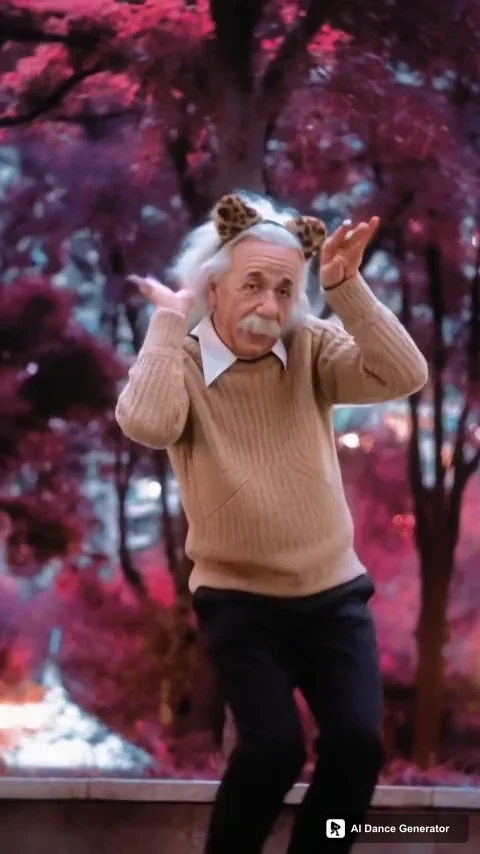
A convincing Nya Arigato edit keeps the same person through a transformation: hands put on a cat-ear headband, green trees turn pink, and the dance becomes playful. Making a character perform generic paw gestures is not the same effect.
Here is the real 15-second example we made for the Nya Arigato AI dance generator, using the exact photo shown below. We explain the selected excerpt, prompt and imperfections so you can judge the complete workflow.
The photo and our actual result
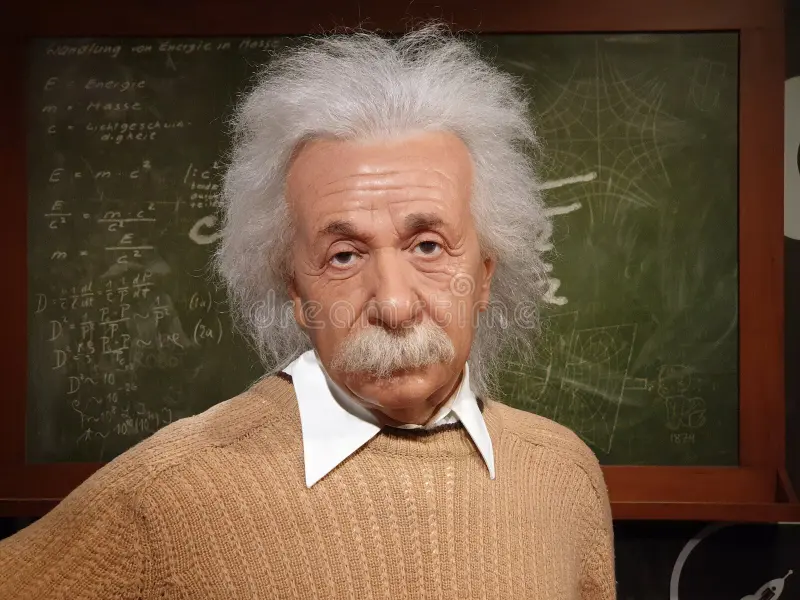
Exact input photo. The unseen lower body must be inferred.
Our generated result, 15 seconds at 480P. The player starts muted.
The white hair, moustache and beige sweater remain recognizable through the reveal. The performer physically puts on the headband at about four seconds; the trees become pink around 4.7–4.9 seconds. The routine continues into paw gestures and ends in a crouch. We did not see the original face or sunglasses return.
It is not an exact copy of the photo: the sweater has a different ribbed-knit texture, black trousers and shoes are inferred, and fast finger movements have blur. This is one reviewed generation, not a measured success rate.
Choose the right Nya Arigato version
The older dance meme is associated with Leat’eq’s “Tokyo” and the chant often written as “nya ichi ni san, nya arigato.” Universal Music’s April 2021 article dates the song to 2018 and describes international TikTok activity in early 2021. That history does not establish when this particular transformation originated or how popular it is today.
Some versions keep a fixed setting. The public demos on Media.io’s Nya Arigato page, for example, show paw gestures without this cat-ear and pink-background reveal.
Our supplied reference matches this outdoor performance. It is the motion source, not the generated result shown above.
Select a continuous excerpt with the whole reveal
The uploaded source is approximately 27.75 seconds. We selected 12.7–27.7 seconds: one continuous 15-second excerpt, without speeding it up, rearranging shots or repeating the opening.
| Moment in our selected reference | Approximate time | | ------------------------------------ | ------------------ | | Opening in the green outdoor setting | Before 3.9 seconds | | Hands put on the cat-ear headband | 3.9–4.5 seconds | | Trees turn from green to pink | 4.7–4.9 seconds | | Paw gestures continue | After the reveal |
These are timestamps in our excerpt, not universal timestamps for every Nya Arigato clip. Taking the first five seconds of the full source would miss this transformation.
The fal reference-to-video documentation separates input-reference limits from requested output duration. We supplied the 15-second excerpt, not the full approximately 28-second source.
Separate identity from intentional effects
The photo defines the person and base clothing; the video defines motion and timed changes. A blanket instruction to keep the background or accessories unchanged would conflict with the pink-tree reveal and headband action.
Our prompt also excludes the source performer’s sunglasses unless the uploaded photo has them.
Exact prompt used for this example
Edit #Video1. Replace the sole performer with the person in #Image1. Take their face, hair, skin, body proportions and base clothing from the photo, not its pose or background. Do not retain the original sunglasses unless the photo has them.

The video defines motion and the cool-to-cute transformation: preserve the gestures, expressions, timing, camera, the action of putting on the cat-ear headband, and the trees changing from green to pink. Keep the headband attached after it is put on. Keep the same replacement identity and base outfit before and after the change; never restore the source performer's face. Natural hands and proportions, with no extra people, actions or cuts.
The prompt release is nya-arigato-lead-wan-v1. These are instructions to the model, not a guarantee of identical results with every photo.
What we tested and what it cost
We used fal’s Wan 3.0 Prime reference-to-video model, one Einstein photo and the selected reference. One paid generation returned 15.000 seconds, 480 × 854 pixels, 30 fps. Provider audio generation was off; we restored the selected reference’s audio locally afterward. Public display copies add the site watermark without changing the generation input.
The provider cost estimate was $2.04 for this attempt, including the 15-second input and 15-second output. That is an estimate, not an invoice or our customer price. The tool shows its current credit total before submission. No automatic retry was made.
The request identifier is 01a13636-296d-78b0-bf87-2096bfec49bf. This article records our own test; it is not independent evidence of popularity or a guarantee of another user's result.
Make and review your version
- Upload one clear adult photo. Full-body framing gives more information than the portrait in our test. Keep the face, hairstyle and clothing visible. See the photo checklist.
- Preview the included routine and check the quote. The tool offers this 15-second excerpt at 480P or 720P. You do not need to write the prompt above yourself.
- Inspect the complete result. Check the face before and after the hands rise, headband attachment, wrists, outfit and background timing. Listen for uninterrupted audio. Download only after reviewing the full clip.
Technical failures return generation credits automatically. Visual imperfections in a completed video are not technical failures; choosing another generation is a separate paid attempt.
How this differs from a CapCut edit
The linked CapCut Nya Arigato template lists 18 media slots and a 1:1 layout. It arranges supplied media into an edit; that listing does not establish character replacement throughout this outdoor transformation. This comparison describes that template, not all CapCut features.
Our preset supplies one specific motion reference and character-replacement prompt. To use another scene or routine, bring your own reference to AI Character Swap.
Use photos, video and audio you have permission to use. Generation does not itself grant music, footage or commercial-use rights. Label realistic AI edits when sharing them.