

Good starting point
- One subject in each photo.
- Face visible, looking roughly toward the camera.
- Even light, with natural skin and facial detail.
- Include the upper body and any outfit you want to reference.
Two photos. Your APT duo. Choose 5, 15, or 26 seconds.Two photos. One pink studio. Cast your drummer and singer in a 5-, 15-, or 26-second APT-inspired performance.
The 26-second APT reference. Upload two photos to recast the duo.
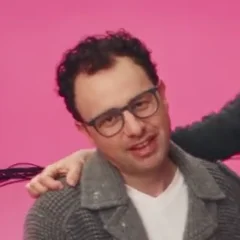
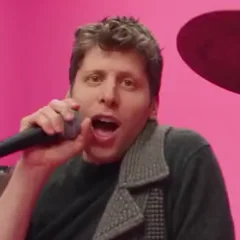
APT AI Video casts a new drummer and singer in a pink-studio scene inspired by ROSÉ and Bruno Mars's APT. music video.
Our template uses a selected 26-second, 16:9 performance reference, not the full music video. Photo 1 guides the person who starts at the drums; Photo 2 guides the opening singer. Choose the first 5 or 15 seconds, or the full 26-second clip, at 768p or 1080p.
Watch the official APT. videoThis preview is the performance reference. The official video below gives the original creative context; your generated result will appear in your video history.
The original song and video are the starting point for this two-role template.
APT. was released as a collaboration between ROSÉ and Bruno Mars. Warner Music lists its release date as October 18, 2024.
APT. release details — Warner MusicThe music video's studio performance gives the remake its setting. This template uses a short excerpt with two opening roles, rather than recreating the whole video.
Watch the official APT. videoChoose one portrait per performer. The role labels refer to their opening positions, even when the performers move or the shot changes.
Assign the two roles, choose length and quality, and check your finished performance.
Upload two separate portraits. Photo 1 is the opening drummer; Photo 2 is the opening singer. Check the labels before continuing.
Choose the first 5 or 15 seconds, or the full 26-second reference. Select Standard 768p or HD 1080p, then check the credit total for your selection.
Check both identities through the drum shots, close-ups, and camera changes. Your completed video is available to preview and download in your history.
Prepare one portrait for the opening drummer and one for the opening singer. Keep both faces clear, even if the original clip changes shots.

A focused format for pairing familiar faces with the energy of a pink studio duo.
The drummer and singer each have their own place in the scene, giving both subjects a part to play.
Your performers do not need to appear in the same photo. Choose the portrait that suits each person best.
The reference connects the drummer and singer in one studio performance. All three lengths use the same opening roles and landscape framing.
Choose the two images and check their roles in one workspace, with the performance reference alongside them.
Compare the fixed pink-studio workflow with editing a CapCut template or writing your own AI instructions.
Choose 5, 15, or 26 seconds at Standard 768p or HD 1080p. Review the total credits for your selection, then use your existing balance or a one-time credit pack. No subscription is required. Failed generation tasks restore their reserved credits.
Keep the two-person idea, or try a single-subject dance.
Cast a keyboard player and a partner in the white-studio scene.
Explore generatorPut a different pair into the orange-booth rap performance.
Explore generatorGive one pet a dance reference, with photo tips for animal subjects.
Explore generatorAPT AI Video Generator creates a two-person performance from two photos and a pink studio reference. Photo 1 guides the opening drummer and Photo 2 guides the opening singer. Choose 5, 15, or 26 seconds in 16:9; the selected length and quality determine the credit total shown before generation.
Photo 1 is the drummer and Photo 2 is the singer. The labels remain visible in the workspace so you can check the assignments before proceeding.
Prepare two separate files, each showing one person. If both people are in a single group photo, crop it into two portraits and leave enough space around each head and shoulders.
Use clear, well-lit JPG, PNG, or WebP images with one visible subject per file. Avoid tiny faces, heavy filters, motion blur, or objects covering the face. Start with photos you own or are authorized to use.
Choose 5, 15, or 26 seconds at Standard 768p or HD 1080p. The tool shows the credit total for your selected length and quality before you submit. Use your existing credit balance or buy a one-time credit pack; no subscription is required. Failed generation tasks restore their reserved credits. Completed videos are available in your history for review and download.
No. The full template is a selected 26-second, 16:9 performance clip, not the entire music video. Choose all 26 seconds or its first 5 or 15 seconds. The official music video is linked for creative context. The template preview shows reference footage, not a generated result.
This workflow edits two subjects into a fixed performance. It does not write a new song or clone a voice; the source performance supplies the music and timing.
Selected photos preview locally. When you generate, the photos are sent to our AI provider for video generation. Use only photos you are authorized to process, with the consent of both people shown. A draft saved for sign-in or credit purchases stays on this device for up to 4 hours; that draft limit does not describe the provider's retention period.
Photos guide the subjects' appearance, but generative video can change facial details, hands, clothing, and expressions. Clear portraits help establish the intended identity; review the complete result before sharing.
Use photos with the person's permission, or original characters you own or are authorized to use. Generation does not grant rights to the photos, reference footage, music, or people depicted. Review the rights needed for your intended use, and do not present a generated performance as a real recording.
Choose two photos, set the length and quality, check the price, and create your pink-studio duo.