Create Your Crazy Frog AI Chase

Two photos. One invisible-bike chase.

Loading…

Two new characters. The same chase.

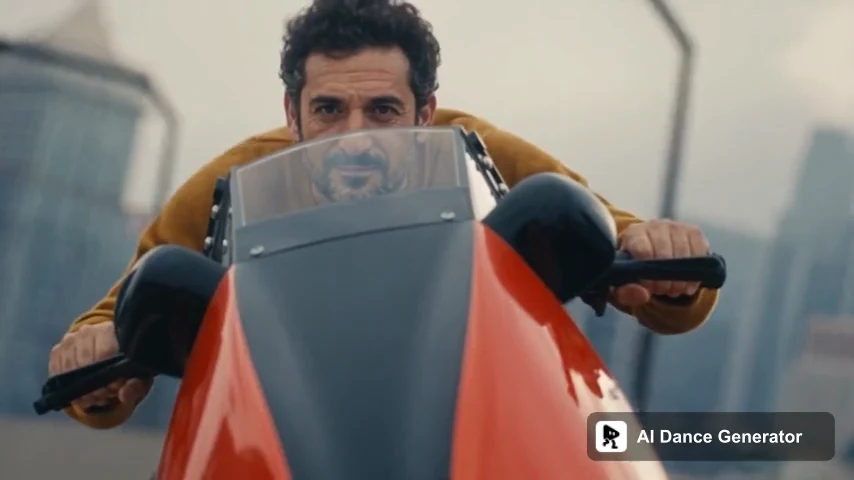
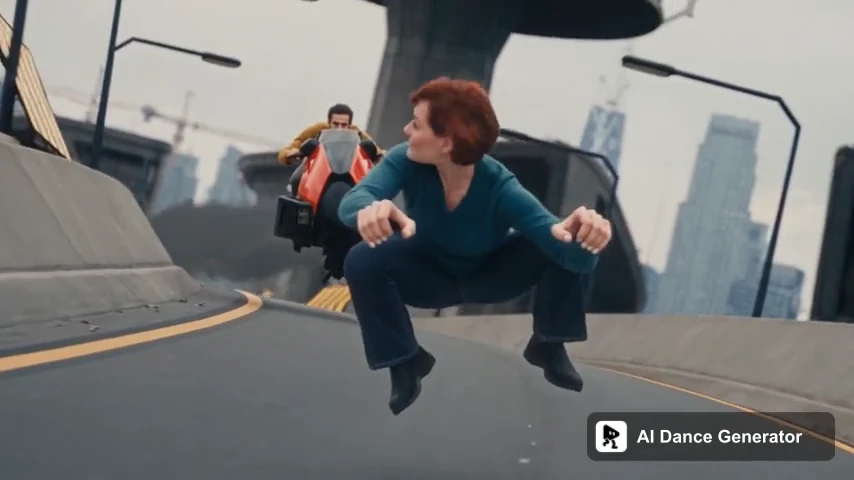
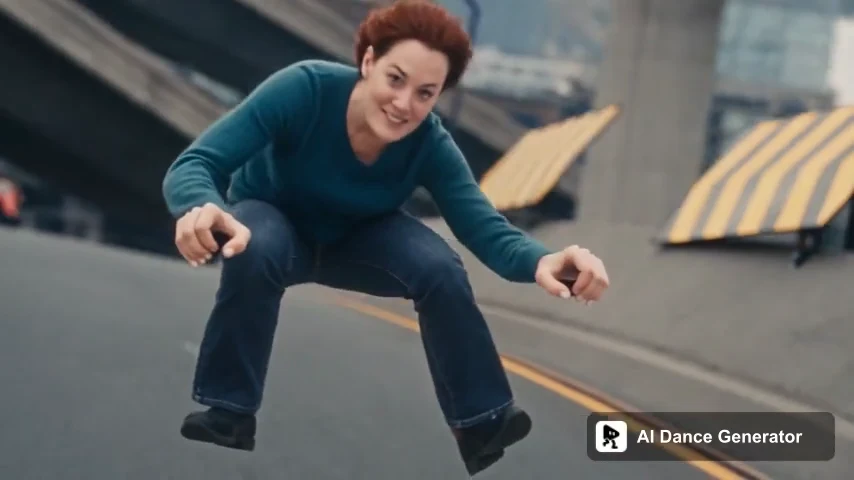
A real 15-second result made with the two fictional adult portraits shown in How to. The teal-clad Rider leads and the ochre-clad Chaser follows. Hair and clothing details can vary.

  1. Generated auburn-haired rider in a teal sweater, miming an invisible motorcycle

    01The invisible-bike rider

  2. Generated curly-haired chaser in an ochre sweater, behind a motorcycle windshield

    02The pursuing motorcyclist

  3. The same generated rider and chaser continuing along the road

    03Together through the turns

What is the Crazy Frog AI video trend?

Crazy Frog AI chase videos recast the invisible-motorcycle gag associated with Axel F. A person takes the rider's role, another becomes the pursuer, and the absurd chase becomes a new character pairing.

The original animated Axel F music video features Crazy Frog riding an invisible motorcycle while a motorcycle-riding robot pursues him. AI remakes borrow that relationship, but may use different roads, lighting, camera angles and human characters.

Watch Crazy Frog's official Axel F video

This template uses an 18-second AI-remade chase, not a direct excerpt of the official MV. Every length starts at the beginning. The music video linked here explains the source gag; this is character replacement, not a voice generator, song cover or dance tutorial.

From Axel F to a new cast

Separate the original animation, later remakes and the clip you choose to generate.

  1. 2005

    The animated motorcycle chase

    Production studio Kaktus Film dates the Axel F release to May 2005. The invisible motorcycle and pursuing robot form the recognizable setup behind this remake format.

    Axel F production credits · Kaktus Film
  2. AI remakes

    The same joke, different characters

    A human rider miming a motorcycle makes the invisible vehicle more conspicuous. Casting a familiar pair adds another layer of contrast. Different remakes need not share the same road or match the original shot for shot.

    View the shared @downey.ai remake
  3. Your version

    Assign the rider and the pursuer

    Use the role labels to assign two photos, then choose the first 5 seconds, the first 15 seconds or the full 18-second chase. The intended result is that same action with your chosen cast—not a new story inferred from the song title.

How to Make a Crazy Frog AI Video in 3 Steps

Choose the two people, check the chase, then review your result.

  1. Add your rider and chaser

    Upload a clear single-person photo to each labeled slot. Rider goes ahead on the invisible bike; Chaser follows on a motorcycle. Distinct looks make the roles easier to check.

  2. Preview the scene and settings

    Choose 5, 15 or 18 seconds at 480P or 720P. All start at the beginning. The 5-second test focuses on the Rider; choose 15 or 18 seconds to include the Chaser's face close-up. Check the total before submitting.

  3. Generate, review and download

    Check both faces, clothing, hands and the rider's invisible-bike pose through the full clip. Download a result you like, or return to it in History.

What photos work best for the chase?

Each image defines one person. Clear faces, visible clothing and readable body proportions leave fewer details to invent.

Example of a clear, evenly lit single-person portrait

Good starting point

  • One adult per image, face clearly visible
  • Full-body or generously framed portraits with visible shoulders and clothing
  • Sharp detail and even light without strong filters
  • Different hair or clothing colors to help distinguish the two roles
Example of a dim group photo with blurred and partly covered faces

Avoid these

  • Group photos with several competing faces.
  • Sunglasses, masks, or hands covering the face.
  • Dark, blurry, tiny, or heavily filtered portraits.
  • Tight face crops when body shape and clothing matter

Two characters. One clear chase.

Role-based inputs keep the setup understandable before you spend credits.

Rider and Chaser, not just photo numbers

Each upload is attached to an action role. Moving across the screen should not swap who plays whom.

Your cast in a fixed sequence

The reference supplies the camera, road, timing and chase. The photos supply the people; they do not define a new road or vehicle.

More than an isolated face edit

Review hair, visible clothing, proportions and the full silhouette as well as likeness. Obscured hands and quick turns can still cause visual errors.

Preview the actual scene

The reference shows which version of the chase you are making. The official MV and other social edits are context, not interchangeable output promises.

How much does a Crazy Frog AI video cost?

Check the full cost of your selected output in the generator before starting.

5, 15 or 18 seconds · 480P or 720P

At 480P: 5s uses 75 credits, 15s uses 225 and 18s uses 270. At 720P: 125, 375 and 450 credits respectively. Check the current total on the generation button before submitting.

One attempt, both roles

The displayed total includes both characters. A new generation is a separate attempt and spends additional credits; your cash cost depends on your credit pack or plan.

Technical failures return generation credits automatically. A completed video with imperfect likeness or movement is not a technical failure.

Crazy Frog AI generator vs CapCut templates vs your own prompt

An Axel F soundtrack does not guarantee the same chase. Compare the displayed action and role controls, not just the template name.

This chase template
What you provide
Two photos, assigned to Rider and Chaser
Scene and movement
The selected clip supplies the chase, camera and timing
Output choices
5, 15 or 18 seconds; landscape 16:9; 480P or 720P
Cost planning
One total for both roles, shown before submission
CapCut templates
What you provide
The photos or clips requested by your selected template
Scene and movement
Varies by template; a song edit may not replace both characters
Output choices
Check the selected template's preview and export settings
Cost planning
Depends on the template, features and account
DIY AI prompts
What you provide
Reference footage, character images and a role-specific prompt
Scene and movement
Depends on reference-video support and how clearly roles are bound
Output choices
You configure the output and check continuity yourself
Cost planning
Generation and any retries are priced by the chosen tool

Try another character-replacement format with the same account.

Crazy Frog AI Video FAQ

What is the original Crazy Frog chase video?

The source gag is from Crazy Frog's animated Axel F music video, released in 2005: an invisible-motorcycle rider is pursued by a motorcycle-riding robot. Human AI remakes can change the setting and shots, so they are not necessarily frame-for-frame edits of the official video.

Which photo becomes the rider?

The Rider upload fills the person ahead on the invisible motorcycle. The Chaser upload fills the pursuing motorcyclist. Use two individual photos and check the role labels; the assignments do not reverse when the camera changes sides.

Is this a face swap, a voice generator or a dance template?

It is a two-character video recast guided by a chase reference. It is not an AI voice cover, a new Axel F song, or a general Crazy Frog dance generator. The intended changes concern the characters, while the reference guides the scene and action.

How long is the video, and what does it cost?

Choose 5, 15 or 18 seconds at 480P or 720P; 15 seconds is the default. Every option starts at the beginning and the longest covers the full 18-second chase. The 5-second opening mainly shows the Rider; choose 15 or 18 seconds for the Chaser's face close-up. At 480P the options use 75, 225 or 270 credits; at 720P, 125, 375 or 450. Totals cover both roles; check the current quote before submitting.

Will both people look exactly like their photos?

Likeness is not guaranteed. Fast turns, helmets or hands near faces, body overlap and changing angles can affect identity. Check the full video for swapped roles, the original face returning, distorted limbs or an unwanted visible motorcycle under the rider.

Can I change the road, vehicles or background too?

This template focuses on the two characters in a fixed chase. It does not offer custom scenery or vehicle controls. Use the AI Character Swap tool when you need your own reference video and edit instructions.

What happens if a generation fails?

Technical failures return the generation credits automatically. Visual flaws in a completed render are not a technical failure. Review a completed result before choosing another paid attempt; finished videos can be found in your account's History.

Is this official, and does it include music rights?

No. This is an independent character-replacement tool, not an official Crazy Frog product or endorsement. Check the actual exported audio; generation does not grant rights to the original footage, recording or someone else's likeness. Use material you have permission to edit and label realistic AI remakes appropriately.