
Include your face and hips
Frame one person from head to below the waistband. Keep both hands visible and leave room beside the hip where the gesture will land.
Make a waist heart pose from one photo.Angle your hip toward the camera and use a curved hand and the opposite fingertip to outline a heart at your waist. Start with a photo that shows your natural silhouette.
In our seven-second AI example, Sam Altman's face, navy suit and tie carry through to the waist close-up. The two fingertips meet and the gap stays open in the last second. The jacket makes one side of the heart straighter. The input ends at the chest, so it cannot show whether the generated waist matches his.

The performer steps toward the lens and angles one hip. A curved hand traces the heart beside the waist, and a fingertip from the other hand completes the top.
The shot moves from a visible face to a close view of the heart. A caption and a pink sticker are visible in the reference.
Watch @_lillisinfo_ make the waist heart poseKnow Your Meme documents the waist heart as an early November 2026 reply to the bicep heart, including photos as well as videos. The seven-second cut here follows @_lillisinfo_ from the opening portrait to the final close-up of the fingers. Know Your Meme
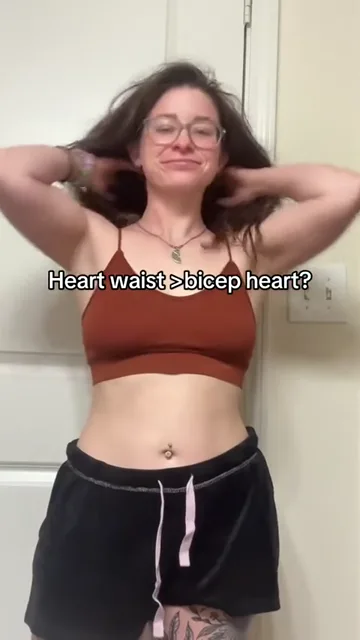
The performer brushes their hair back and lowers both arms. The opening gives you time to recognize the person before the close-up.
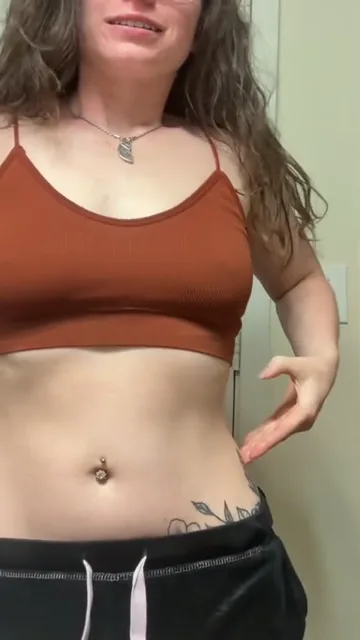
The performer takes a step closer. One hand curves into a C beside the hip, leaving room between the palm and the side of the body.
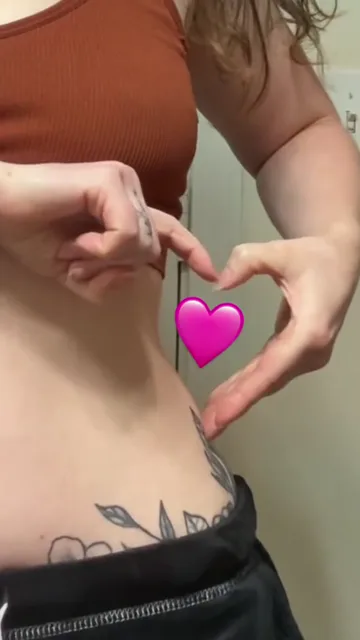
The opposite index finger meets the curved hand at the top. The fingertips, the waist and the space between them make the heart readable through the final hold.
Upload one photo that shows your face, torso and hands. Leave some space on either side of your waist.
The clip runs for 7 seconds. Choose 480P or 720P to see the credit cost before generating.
Pause on the finished pose. Look for a clear gap inside the heart, distinct fingertips and the same waistline as in your photo.
Frame one person from head to below the waistband. Keep both hands visible and leave room beside the hip where the gesture will land.
A shirt with a clear side seam gives the hand an outline to follow. An open jacket, a bag held against the hip or a deep shadow can hide that edge.
Choose a resolution to see the credit total on the button. Uploading photos does not start generation.
No. A relaxed pose with the hands away from the torso shows the model where the wrists and waist begin. The clip supplies the movement.
A covered waist can work. In the suit example the shirt edge provides the outline, though the jacket makes the left side look less curved.
No particular waist size is required. The hand can move to suit the person's contour. Use a photo with the waist in frame if you want to compare the result with the original.
The creator placed a sticker inside the gesture at the end. In our generated example you can see the opening between the hand and the jacket without a sticker.
In the final second. Look for contact at the top, a point near the waistband and a visible opening between the hand and the body.