

Works well
- One person with a sharp, unobstructed face
- A front or slight three-quarter view in even light
- A waist-up or full-body view showing the desired outfit
- Visible hair and a clear outline of the body
One photo. Your look. The Carson Shearer dance.Put yourself in the Carson Shearer dance. One photo supplies your look; the reference supplies the moves, camera and scene changes.
This AI Dance Generator example uses the exact Einstein photo shown in How to. It is a 12-second edited excerpt from a 15-second, 480P generation, not the full output.
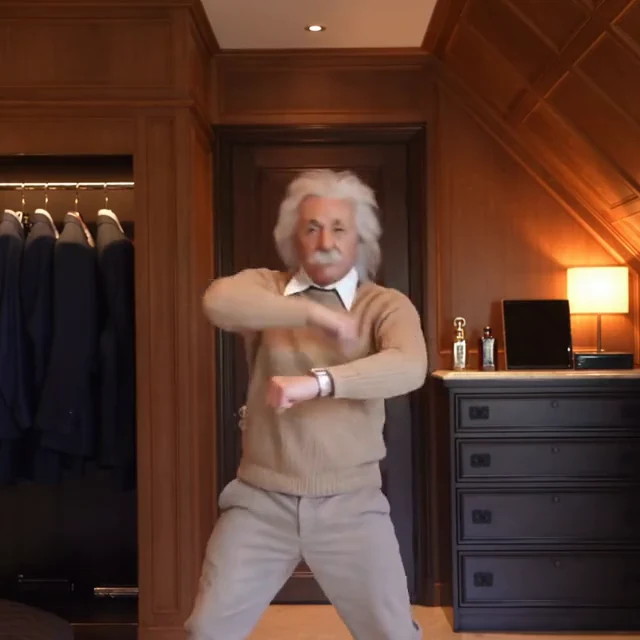
01The opening
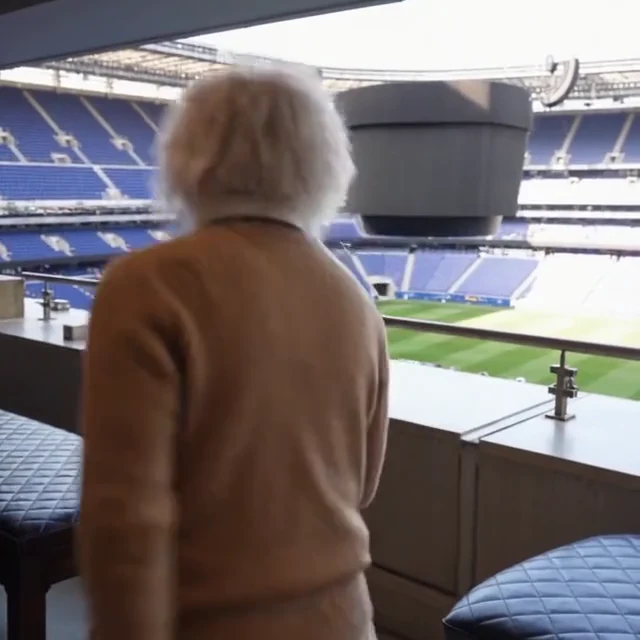
02The stadium cut
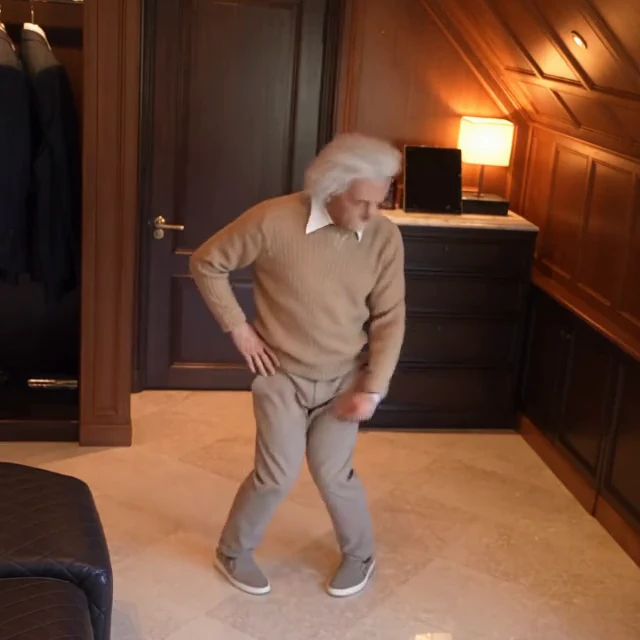
03Back in the room
Carson Shearer dance, also searched as Car.shearer dance or Collard Greens dance, is associated with Carson's 2020 stairwell clip. Later recreations place the recognizable dance in other settings.
This page follows a later, square-framed version: one dancer in a warm wood-paneled interior, with camera changes and a stadium-box cut. Your photo replaces the dancer's appearance while that sequence guides the video.
View the supplied Instagram referenceThe room, camera and cuts belong to this particular reference. They are different from the original stairwell recording. The source link identifies the supplied Reel, without claiming it is the first version of the dance.
The name connects several versions. The reference you choose determines the actual scene and edit.
Know Your Meme traces the dance meme to a July 2020 TikTok by car.shearer, set to Collard Greens. That historical clip is the context for the name, not the room sequence used here.
Dance history · Know Your MemeThe supplied Instagram versions provide context for the newer look. A wood-paneled room and cuts to other settings should not be mistaken for details of the original 2020 recording.
View another supplied Instagram versionUse one photo to define the dancer. The 15-second option follows the first 15 seconds of this reference; the 5-second option follows only its opening.
You only need one photo. The dance reference is already selected.
Choose a photo that shows the face, hair and clothing you want in the result. A waist-up or full-body image gives more information about build and outfit than a tightly cropped selfie.
Start with the default 15 seconds at 480P, or select 720P. Five seconds covers only the opening. Check the total credits, then select Make This Dance.
Watch the face, hands, feet and outfit, especially when the camera or scene changes. Open the completed video from History and download the version you want to share.
The photo is the appearance reference for one dancer, including the clothing. Details outside the image must be inferred.

The reference sets the performance so you can focus on the person you put into it.
Your image guides face, hair, build and visible clothing. You do not need to dress like the reference performer or add a hat.
The selected reference includes its indoor setting, camera changes and stadium-box shot. You do not need to write a separate prompt for each cut.
Use 15 seconds for the reference sequence offered here. Use five seconds to check only the beginning; it does not condense the longer sequence.
The Einstein example pairs the exact input photo with an actual generated result. It lets you inspect what changed before submitting your own photo.
The generation button shows the total credits for your chosen duration and resolution before you submit.
Choose 5 or 15 seconds at 480P or 720P. The default is 15 seconds at 480P. A longer clip or higher resolution uses more credits.
Each new submission is a separate generation. Inspect the photo and completed clip before deciding whether another attempt is worthwhile.
AI can alter facial details, hands or clothing across movement and cuts. The example shows one result; it does not guarantee an identical outcome for every photo.
Choose by what you want to change. Face-swap templates, edited photo sequences and full-character generation offer different controls; the dance name alone does not make them equivalent.
Use a different ready-made scene, or choose your own reference for a custom character edit.
Bring your own reference video when you want a different scene or edit.
Explore generatorTry a different solo dance with a ready-to-use motion reference.
Explore generatorBrowse more solo, duo and group video scenes.
Explore generatorNo. The name refers back to Carson Shearer's 2020 dance associated with Collard Greens. This page uses the later reference shown here, with a wood-paneled room, camera changes and a stadium-box cut.
One photo of one person is required. Upload it in Your Photo. It defines the dancer throughout the selected clip; you do not need another image for each scene.
Yes, the photo guides the face, hair, build and visible outfit. A waist-up or full-body photo gives clearer clothing information. A hat is not required. Unseen parts must be inferred, and small details may change.
No. Five seconds uses only the opening five seconds of the reference. The 15-second option uses its first 15 seconds and includes later scene changes. Neither option speeds up the full source video to fit.
This template keeps the supplied reference for the dance, camera, scenes and cuts. It has no custom background or reference upload. Use AI Character Swap if you want to work from your own video.
The output is 1:1 square, at 480P or 720P. There is no separate vertical composition on this page. If you crop the result for a vertical post, check that the dancer's hands and feet remain visible.
The photo guides the character, but exact identity, fabric details and body proportions are not guaranteed in every frame. Review the full clip, particularly fast movements, close views and scene changes.
The template uses the reference clip's audio for your selected duration. Collard Greens is the song associated with the original dance. Generation does not grant music rights or guarantee that a social platform will keep the sound; check the rules for your use, or mute or replace it before sharing.
Select a length and resolution to see the total credit cost on Make This Dance. Your task appears in History, where you can check progress and open the completed video. A new submission is a separate generation.
Yes. It uses the exact Einstein photo shown beside it. The displayed 12-second excerpt is trimmed from an earlier 15-second, 480P generation to remove an incorrect ending. It is not the full output or a test of the revised prompt. New generations can be 5 or 15 seconds, and results may vary.