Unforgettable AI Car Video Generator

Your photo + your car → the UNO 24 reveal.

Loading…

One new person. One new car.

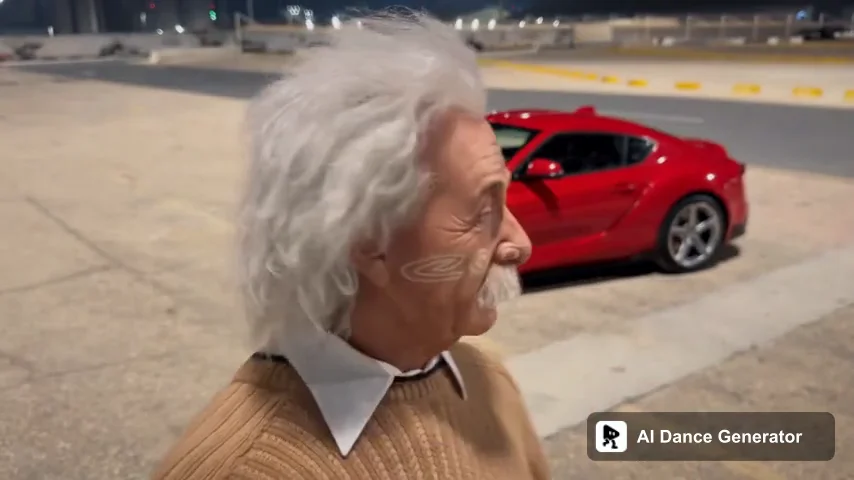
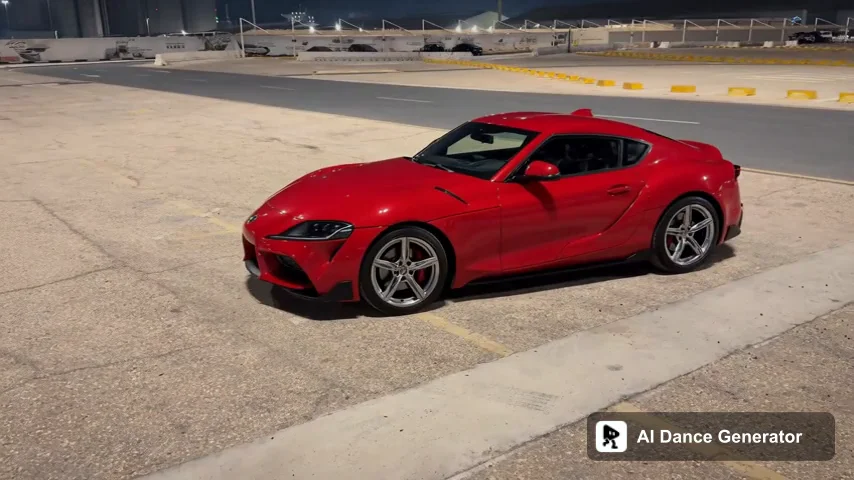
An actual 15-second output using the Einstein portrait and AI-created red coupe shown in How to. The cards and reveal follow the reference; the generated car combines the input color with some of the source car's body shape.

  1. Generated Einstein character in a brown sweater holding a number card

    01The person from your photo

  2. Generated Einstein character with the replacement red coupe after the lens-cover transition

    02The car appears behind them

  3. Generated red two-door coupe with silver wheels in the reference parking lot

    03Your vehicle in the same scene

What is the Unforgettable UNO 24 car trend?

The Unforgettable car reveal starts with a person showing number cards, hides a transition as a hand passes the lens, then reveals a car behind them. AI versions personalize the person and vehicle while following that sequence.

In the y0kun Reel used here, a person in white clothing shows a 2 and a 4 before the lens-covering gesture. A parked car appears behind them, followed by pointing, a turn and a hands-on-head reaction. The moving landscape shot is part of this particular reference.

View the reference Reel by y0kun

Also called the UNO car reveal or UNO 24 car trend, this is a person-and-car replacement template, not a driving simulator. The linked Reel identifies our reference; it does not establish who first invented the wider trend.

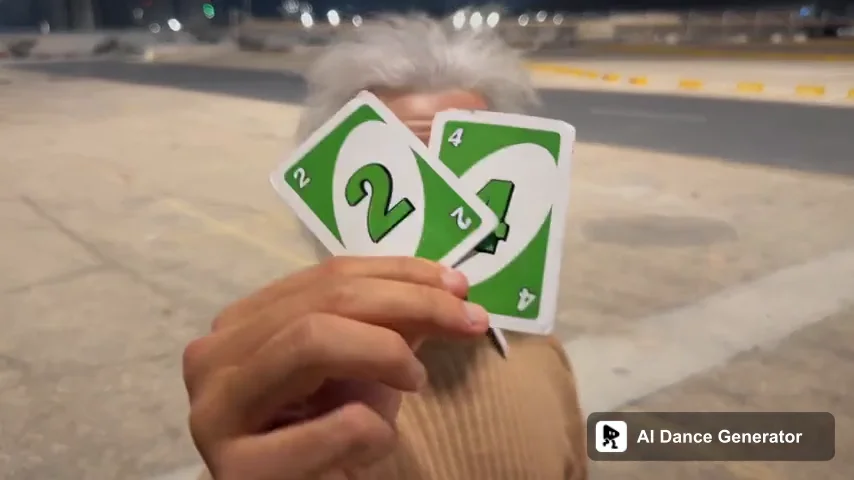
The same reveal, a different person and car

The cards and hidden transition connect the versions. The exact gesture, framing and timing depend on the reference.

  1. The reference

    Number cards, then a car

    This page follows the 15-second landscape Reel linked below: cards near the camera, a hand over the lens, then the parked-car reveal and the performer's reaction.

    View the reference Reel by y0kun
  2. AI recreations

    Separate references for the person and vehicle

    Media.io describes an image-plus-reference workflow with one image for the person and another for the car. Other versions change the location too. Those controls and supported durations depend on the tool; they are not interchangeable presets.

    Media.io · Unforgettable reference workflow
  3. Your version

    Two images, one fixed scene

    Here, upload one person and one car. The parking-lot scene stays fixed. Select the full 15 seconds to include the reveal and the reaction, or use the 5-second opening for a shorter check.

How to Make an Unforgettable AI Car Video in 3 Steps

Choose who holds the cards, choose the car, then generate your version.

  1. Upload your photo and your car

    Use Your Photo for a clear single-person image and Your Car for the vehicle. These are different inputs, not two character slots. Include the person's clothing and the car's full body and wheels.

  2. Choose the video length and quality

    The 15-second option includes the full reveal. The 5-second option covers the opening only. Both start at the beginning. Choose 480P or 720P and check the total credits before generating.

  3. Review the reveal and download

    Watch the card gesture, the face after the lens clears, and the car's color, shape and wheels. Check the full clip before sharing. Your completed video is also saved in History.

What photos work best for a car reveal?

Give each upload one clear job: the first image defines the person; the second defines the vehicle.

Example of a clear, evenly lit single-person portrait

Works well

  • One person, with a clear front or slight three-quarter face
  • A waist-up or full-body photo showing the desired clothing
  • One complete car from a front three-quarter angle, with wheels visible
  • Sharp detail, even light and a background that does not hide the subject
Example of a dim group photo with blurred and partly covered faces

Avoid

  • Group photos or faces hidden by sunglasses, masks or hands
  • Only a car badge, interior, wheel or heavily cropped bodywork
  • Several cars in one image, motion blur or very dark lighting
  • A collage of a person and car in place of the two separate uploads

Your identity, your car, the familiar reveal

Two dedicated inputs keep the change simple. The scene and performance come from the reference.

Choose the person, not just a face

The person image guides the face, hair, build and visible clothing. Include the outfit you want rather than relying on a close-up selfie to define it.

Give the car its own reference

Use a vehicle image to guide body shape, color and wheels. Small details such as badges, lettering and wheel spokes can change and need checking.

Keep the reveal sequence

The full version follows the card gesture, lens cover, car reveal and reaction. You do not need to describe a new story or write a prompt.

Know what the short option covers

Five seconds is an opening test, not a faster edit of the whole performance. Choose 15 seconds for the complete sequence.

How much does an Unforgettable car video cost?

The generation button shows the total credits for your selected length and resolution before you submit.

Length and resolution

Choose 5 or 15 seconds and 480P or 720P. Both required images belong to the same generation; you do not buy a separate person edit and car edit.

Each generation is an attempt

A new request is a separate generation. Review the photos and settings first, especially if you are testing a car with intricate wheels or a heavily obscured face.

AI can change small details. The selected credit cost is not a promise of a perfectly identical face, badge, number card or vehicle.

Unforgettable AI generator vs CapCut templates vs a custom prompt

A card-sweep transition and a person-and-car replacement are different jobs. Check what each selected workflow actually changes.

This car reveal template
What you provide
One person photo + one car image; the reference is set
Scene and movement
The reference defines the cards, lens cover, reveal and reaction
Output choices
5-second opening or full 15 seconds; 16:9; 480P or 720P
Cost planning
Total credits for the selected settings shown before generation
CapCut templates
What you provide
Photos or footage required by the selected template
Scene and movement
Timing and effects vary; a transition alone may not replace both subjects
Output choices
Check the chosen template's framing and export settings
Cost planning
Depends on the template, features and account
DIY AI prompts
What you provide
Person image, car image, reference clip and written instructions
Scene and movement
You choose the motion reference and specify what changes
Output choices
Duration, image support and audio depend on the tool
Cost planning
Generation and retry charges depend on the selected tool

Keep exploring character replacement and ready-to-use scenes in the same template library.

Unforgettable AI car video questions

What is the UNO 24 Unforgettable car reveal?

It is a card-to-car transition associated with the song Unforgettable: a person displays number cards, covers the lens, then reveals a car. This template follows the linked y0kun parking-lot clip, including the reaction after the reveal.

Why do I need two images?

Your Photo identifies the card-holding person, while Your Car identifies the vehicle. Both are required. Upload them separately; this is not a two-person template and the inputs should not be exchanged.

Does it replace clothing as well as the face?

The person image guides the face, hairstyle, build and visible outfit. Use a waist-up or full-body photo that shows the clothing you want. Parts outside your photo must be inferred, and details may vary.

Will the car match my photo exactly?

The car image guides its shape, color and visible details, but exact reproduction is not guaranteed. Check the body proportions, wheels, badges and reflections after the reveal. A complete front three-quarter view gives clearer information than an interior or close-up.

Does the 5-second option include the whole car reveal?

No. It uses the opening five seconds from the same reference and is intended as a short check. Choose 15 seconds for the full card gesture, reveal and reaction; the short option does not speed up the complete sequence.

Can I change only the car or upload a new background?

This page requires both a person photo and a car image and keeps the reference setting. Car-only editing, a third location image and custom reference videos are not controls in this template. Use AI Character Swap for a custom reference-based edit.

Does the finished video include music?

This template uses the reference clip's audio for the selected duration. That does not grant rights to the song or recording. Check the rules for your intended use, or replace or mute the audio before sharing.

Is this a vertical video or a landscape video?

This template keeps the reference's 16:9 landscape framing so the cards, person and car stay in the scene. It does not offer a separate 9:16 composition. Cropping it vertically afterward can cut off important parts of the reveal.

How much does it cost, and where is my result?

Choose the length and resolution to see the total credit cost on the generation button. The task appears in History, where you can check its status and open the finished video. A new submission is a separate generation.

Is this an official UNO, artist or car-brand tool?

No. This is an independent AI template, not a partnership with UNO, the song's artists, any car manufacturer or the reference creator. Use images you have permission to edit, and check music and video rights separately.